Monday, November 11, 2019

FlipGrid Fundementals

FlipGrid Home Page features a button for Educator Login which uses the Microsoft or Google domain account to allow access to the site.


Grids

Previously posted October 2018

A Grid is your classroom or community of learners. Grids have Topics and Topics have Responses.

Adding a New Grid is relatively easy. First click on the +New Grid button. Then, fill in the form that provide the details for your grid. You can designate the community type and choose from school domain (ex. su.edu), a student ID List or make the grip public. The School domain option requires a user account in that Microsoft or Google domain.

There are features that can be activated or deactivated such as notifications, downloads, followers and captions. I activated notifications so I would know when someone posted and allowed downloads in case someone wanted their own copy of their video. I did not activate Grid Followers which would notify students when new Topics are posted or videos recorded nor did I activate captions which would display auto-generated captions for the video.

I did personalize the Grid with a banner image. The banner can be selected from a Library or uploaded from your computer.

Topics
Topics are the individual prompts within the Grid. Add a Topic in the same way as adding a Grid, click the +NewTopic button and again fill in the topic details. The details that can be controlled within a Topic include Response Time (from 15 to 90 seconds in the free version). A Display Date can be set but it requires a paid version to set and end date so the Topic must be manually set to Inactive. Here is where you also add the text for your Question or prompt, set up Moderation if you want to approve video posts.

You can Change the status of the Topic from Active to Frozen to Inactive. Section 4 of the Topic Details has a setting to allow students to respond to one another, allow Video Titles, show the number of views and allow emojis as a reaction to the video. Consider these options carefully based on your purpose and your audience.

The FlipGrid Topics listing shows each Topic created within the Grid and allows for management and utilization of the Topics.


Responses

Once you share the link or code with students, the student can post a response. The interface for students can include a description of the task in either text or a video or both. Students are given a timed window for response. There is a redo button if you don’t like your first take. There is also an option for uploading a video hidden under the options gear. Once the student has recorded there is also option for adding a caption which can include hashtags for improving search capabilities and also attaching a file to the video.

The student responses are shown below with a unique link and actions for sharing and extending the conversation including the creation of a MixTape of the Responses that stand out or each and every one of the recorded Responses. The instructor can create and edit the mix. 


The Student Response roster in flip grid shows each individual response and the tools that can be used to manage and utilize those responses.

I feel there is a fairly easy point of entry for those new to FlipGrid and some solid features and functionality for those that like to either geek out or create more robust possibilities for Topics, Responses and ongoing interactions among students.

There is also great potential for collecting content to create a culminating multimedia project from the Grid to evidence depth of knowledge and the evolution of ideas among learners. I would strongly recommend the nine minute video tutorial by Richard Byrne to help you get started.

Here is an example of a Grid Topic I used with the EDU585 Fall 2019 class. You must use your SU.EDU account to view the Grid Topic.

Monday, March 11, 2019

Deeper Class Discussions with TQE

I read the blog post from @cultofpedagogy and then followed the source to another blog post by @MarisaEThompson and it took me down a path with my EDU 585 students that I wasn't realy expecting. I found myself on a soapbox about purposefulness and intentionality about building relationships with your students, about the higher goals of process over product and some of the demands of the modern classroom and the inherent accountabilty that often lead us away from the very thing we sought to accomplish. Read more about a similar journey of discovery and deeper class discussions with TQE.

Formative Assessment

The conversation started around the use of formative assessment, particularly about digital tools to conduct formative assessment. I wanted to use a simple tool to gather some thoughts from the class to demonstrate one form of finding out their Thoughts, their Questions and their Epiphanies. I choose to use linoit. The information that the class provided was insightful. It gave me a better understanding of what they knew, the questons they had and the ah-ha moments that had come to them during the week's assignement or in the last 5 minutes before we started the activity. See the digital sticky notes they posted below. Click the link below the image to view more.

linoit sticky notes on formative assessment

Formative Assessment TQE 585

Digital Age Learning

The insights from the digital sticky notes helped to drive a discussion that supported statements or answered questions for others and allowed participants to continue sharing their thoughts, asking questions and arriving at their newly formed epiphanies. I hope that their epiphanies were as meaningful as mine. Digital Age Learners, as described by the ISTE Standards for Students, need to be empowered learners, responsible citizens, constructors of knowledge, innovative designers, computational thinkers, creative communicators, and competent collaborators. The students in today's classrooms are far more savvy, far more discerning, and far more capable than we give them proper credit for being and doing. 

Participatory Culture

Learners are not as much engaged by the end product as they are the process. Digital Age Learners yearn for a participatory culture. John Spencer captures seven reasons to show your work. He talks about when people share their work they begin thinking about your thinking, innovating, mentoring collaborating, storytelling, building courage, embracing revision and shares this revelation to summarize the value sharing your work.

"When students only share their highly polished, finished work, they miss out on the opportunity to improve their work through multiple revisions. However, when they actively share their process and their progress, they begin to internalize the idea the idea that creative work is all about iterations." 

Intrinsic Motivation

I hope in that moment when this all came to me and I stomped upon my soapbox, that the students in EDU585 realized it isn't about that perfect end product, it isn't about satisfying the points on a rubric. I hope they realized that it is about iteration, inspiration, and an intimate look at who they are as a learner and who they want to become as an educator. In the end they will create and submit their products to meet the course requirements but I truly hope that what they remember more was the process, their persistence and the payoff and that their motivations were intrinsic and that they own the learning.

Monday, February 25, 2019


On Active Learning: from experts and practitioners


This week in class we read the article Active Learning Leads to Higher Grades and Fewer Failing Students in Science, Math and Engineering. The wired magazine article discussed the increase in performance of students that were exposed to active learning as opposed to traditional lecture.

Quotes from class participants when responding to the article:

Active learning engages students by increasing students' accountability and collaboration through activities and/or discussion in class in order to emphasize higher-order thinking, real-world skills, and foster a teamwork mentality. 
Active learning engages students in the process of learning through providing multiple modalities to enhance an authentic learning experience.  Allowing students to make choices in their learning experience and emphasizing critical thinking through collaboration, creativity, and communication among students.
I think people make assumptions about the length of time one has been teaching. In the end, the time planning and crafting lessons and engaging students really makes a difference. 
This proves that students need information, the time to manipulate the information/content, and the ability to be guided and allowed to discover what the content/information means to them. 
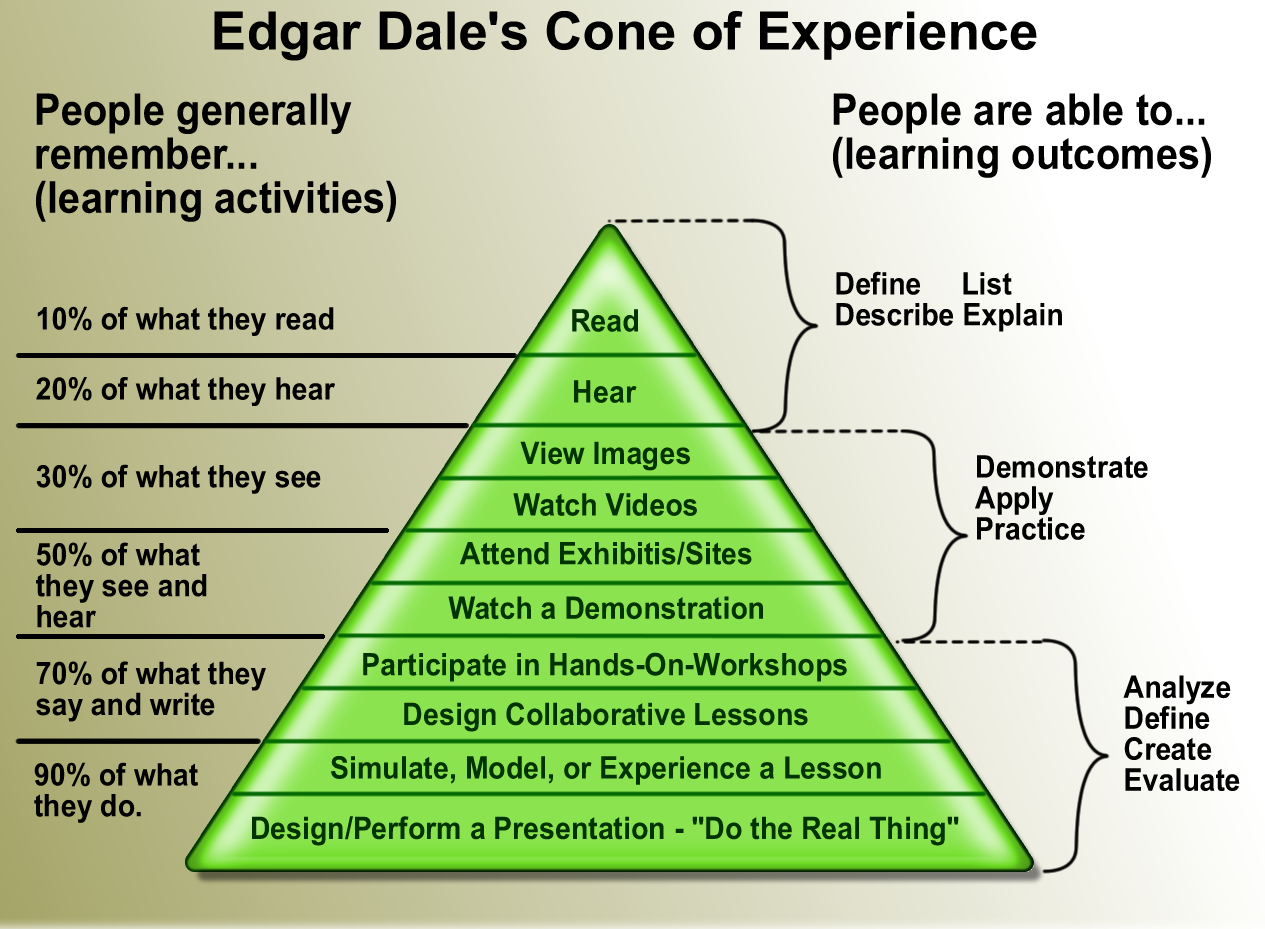
Cone of Learning Edgar Dale
A well-rendered graphic of the theories presented by Edgar Dale regarding human learning from https://upload.wikimedia.org/wikipedia/en/2/29/Cone_of_learning_export_11x17.png

Feedback

I also received some important feedback on incorporating more active learning strategies and some ideas about which types of activities the students preferred.  The feedback was solicited at the beginning of the discussion. As the students read the article and responded there seemed to be increasing evidence that their ideas and preferences were aligned with the findings of the researchers. I wonder if we asked students for feedback regularly if we could adjust our teaching styles and methodologies to better meet the need for active learning.

Boredom is the Enemy
created by rcarnill90 for this post in Canva

What We Already Knew

At the end of the article I asked the students to view the video below as it related to active learning theory. When we discussed the video we found we already knew a lot about the topic. Now what was left was to begin applying our knowledge to make it our practice, as I plan to do in the future class meetings for EDU585.


Monday, January 28, 2019

HyperDocs: Docs Beyond Word Processing

Beyond Word Processing

Where We Are

I always start this Educational Technology Applications course, EDU585, with a survey of student skills, a needs assessment if you will. I like to get a handle on the kind of learner I am dealing with by getting a snapshot or pulse on their skills, abilities, knowledge and dispositions. I start by asking each learner to share a few insights about how they see themselves as a user of technology.

This group, along with many others, have rated themselves highly in word processing. There is a great deal to know about the word processing tool and the associated techniques. I wonder how they as teachers will employ this tool and what capabilities they feel it possesses as an instructional game changer. I hope that they reach beyond reports, headers, footers, citations and the like.

HyperDocs According to the Experts

I know at this point in the program they have had their fair share of research papers and response papers and term papers to write. They must have found success in using word processing to document their learning. So, I want to make sure that they are prepared to use this tool in their teaching. Enter, the Hyperdoc...word processing beyond word processing. If you are not sure what exactly is a Hyperdoc, then you need to visit the HyperDoc Girls website to learn more.

Once you understand the basic concept of transforming student learning through the use of personalized digital lessons and instructional delivery. You should dig a little deeper by listening to this Google Teacher Tribe interview with practitioner Sean Fahey. (There is A LOT of INFO in this session...the interview with Sean starts around the 14:30 mark).


Matt Miller and Kasey Bell continue the conversation about Hyperdocs by going back to the source. They interview one of the original HyperDoc Girls, Lisa Highfill in the very next episode of the Google Teacher Tribe podcast. (Once again...tons of info...the chat with Lisa starts at about 5:30 mark).


Transforming Teaching and Learning

And now I want to point you back to Sean Fahey and a blog post featured on Matt Miller's Ditch That Textbook site. Sean cover's 9 Reason's Why HyperDocs Can Transform Your Class. While you are reading this, consider the ISTE Standards for Educators and jot a little note about each one as your read the blog. Do you remember all 7??? Well then, you can refer back to them at https://www.iste.org/standards/for-educators. How might this information change your ideas about word processing, delivery of instruction and evidence of learning?

Tuesday, August 28, 2018

Fall 2018 First Class Meeting

Getting Started

My little bump in the road

So I must admit that it had been several months since I had launched ZOOM as the host or instructor. About ten minutes before the class was to start I launched everything up that I was going to need for the class session and then started the meeting in ZOOM. I have done this dozens of times but for some reason everything seemed different or out of place and it took me a few minutes to get my bearings and begin interacting with those that had joined early and start helping out those that were having difficulty joining.

This was a gentle nudge or reminder of how the participants must have been feeling as some of them joined a distance course via video chat for the very first time and other like me had spent some time away from the environment. A little nerve racking and a little hard to swallow but a good dose of perspective right from the start.

Welcome, now why are you here?

The introductions went much the way they would at the beginning of any course at the beginning of any semester. As we each describe our status as student or educator or both we found that our technology backgrounds and experiences were all over the place. As we took a look at some of the data gathered about our group from the needs assessment we discovered that much like any workplace or school setting we all brought backgrounds and experiences that make for lively discussions.

Here is where we will start the semester...
Rate Yourself as a Tech User


Rate Yourself as a Tech Integrator


There was a slight difference in where participants rated themselves in the survey and how they described themselves during their introductions. Regardless of the starting point we are all on a journey of professional and personal growth.

Asking Good Questions and Finding Better Answers

I introduced the idea that the only 'stupid questions' are the ones you do not ask. One of the key goals of this course experience is to be able to ask good questions. In order to do so you have to build up your background knowledge concerning educational technology applications. In order to find better answers you must consider how you learn best and how you move toward proficiency or even mastery of a topic. The discussion turned at one point about learning how to learn a topic we will revisit often as we grow our technology knowledge.

There was a really solid exchange of ideas as we discussed the seven International Society for Technology in Education (ISTE) Standards for Educators. Without any prior instruction on the standards, participants were asked to weigh in on what each of the seven key words meant to them. Remarkably, the learners showed great insight into how those terms applied to educational technology and we seem to have a strong foundation to build from during the semester's experiences.

I, for one, am really looking forward to it!

Friday, February 9, 2018

Embedding Published Google Slides Presentation

Blogger: Embed Published Google Slides Presentation


Once your Google Slides presentation is complete:

  • Follow the File menu in Slides to Publish to the web
  • Link will be the default choice, choose Embed
  • Choose the Slide Size (small usually works best)
  • Select and copy the embed code

Ex. <iframe src="https://docs.google.com/presentation/d/e/2PACX-1vQMRdq-gvmvx2zR6FomNdkc0JwUj3Eg9OX9C6XGkKGK7Ty6yDYvw2bAXj06FDsAP-pOvY_MV1D6beIm/embed?start=false&loop=false&delayms=60000" frameborder="0" width="480" height="389" allowfullscreen="true" mozallowfullscreen="true" webkitallowfullscreen="true"></iframe>

  • Change the edit view in Blogger from Compose to HTML
  • Paste the Code into the editor
  • Switch back to compose to preview results
Optional: Click and drag across the image to select and then use the alignment tool on the tool bar to push left, right or center.

When the presentation is updated, the changes appear on the refreshed page where the embed code was used. No need to return to that web page to edit or update the information.

One can also opt to stop publishing and preserve a static version of the presentation if needed.

  • File
  • Publish to web
  • Stop Publishing

Sunday, February 4, 2018

EdTech Tool Certifications: Maximizing the Benefit


EdTech Tool Certifications: Maximizing the Benefit


I will use Edpuzzle as an example in this writing but the same approach could be taken with any product or suite of products that provide avenues for professional learning and/or certification. EDpuzzle is a safe video platform that keeps students engaged and accountable while watching videos.The teacher selects the videos the students will watch and embeds comments and questions to track student understanding.

Getting Started


Getting Started with Edpuzzle is easy. Visit http://edpuzzle,com and log in as a teacher. Creating an account is made really easy as is subsequent logins when you connect your Google or Edmodo account. More and more cloud based digital resources are moving to this type of account management which for school divisions is very helpful. Once you have the security parameters set for the original account the subsequent accounts allow only the directory information to be shared and that limits the risks for students, teachers and school districts. It also limits the number of usernames and passwords a user must remember.

Accessing the Content


Once you have logged in,  visit the My Content tab, then scroll down the page to find Resources and then click on Courses and Certificates. Obviously, this will provide you the training you would need to get started using Edpuzzle.  Take a minute to browse around and see what you can see. Once you find the course you are looking for Edpuzzle will provide you with the join code. You then log out as a teacher and log back in as a student to join the course. I appreciate this particular approach as it allows the educator to experience the interface as a student would and this helps the educator to better prepare the lessons for the student. I will guarantee that the time will be well spent when compared to trying to learn the interface by trial and error. 

If you are not able to easily find the training course components for an educational technology application, find the contact us page or link and submit a quick inquiry to see if a company representative can point you in the right direction. The training materials can be hidden behind a password or in some cases require a payment. Luckily most are like Edpuzzle and provide training to users without cost. If there are fees or commitments, practice good digital citizenship and spend some time investigating your options before committing yourself. Many times you can also search the web to find tutorials that other users have created to help others get started and learn more about using the applications.

Courses and Certifications


There is however value added to this type of offering by a software application. Teachers are required to participate in activities the provide ongoing professional development. Over the course of a 5 year period a teacher must earn 180 points toward license renewal. The certificate provided will verify participation and also the number of hours spent in the coursework or in earning the certification. When scrolling through the menu of online professional development offered by Edpuzzle one will find many choices that go far beyond basic tools training. I like that there are initially two levels, one for teachers just getting started and then a second for teachers that have been using Edpuzzle for a few weeks. The menu continues on to offer specific courses on effective utilization for users of all levels as well as an advanced coaches course for those that provide support to teachers and train others on how to use educational technology applications. Each is broken down into modules and the time commitment is right out in front so participants know how to plan out their self paced learning.

License Renewal Points for Participation


Understanding how to earn points helps teachers to maximize the benefit of their efforts to learn new educational technology applications. Most teachers follow a well beaten path of coursework from colleges or universities or professional conferences. Another popular option is professional development activities which are usually decided upon by the school district. One could also participate in Curriculum Development, Publish an Article or a Book or serve in the role of Mentor or Supervising teacher. Taking full advantage of educational software application courses and certifications would fall under educational project. 

According to the Virginia Department of Education an educational project is an option for the license holder to enhance the skills or advance the educational needs of the group being served i.e. teachers as learners or students of the teachers learning, given our example, new educational technology applications. For more details please see the Educational Project Parameters listed below.

Continuing with the example of Edpuzzle, one would need to identify and write a goal related to content learning objectives and educational technology proficiency specifically including Edpuzzle (or any other application you are learning) in the intended outcomes of the goal statement. Working with a supervising administrator to refine the goal and identify the documentation, artifacts and processes for submitting said items will kick off the process. Making the project time bound will further identify the expectations and build in a system of accountability as well as set a target for the hours encumbered that will eventually translate to points awarded for the educational project.  

Learning to Learn EdTech


When learning to learn edtech I would encourage educators to use the tutorials that the developers provide, search out others that have used the application both near (grade team, district technologists, etc.) and far (online tutorials, user groups, PLNs on Twitter or other social media platforms). Once upon a time, new users had to open up the software and go it alone to learn the ins and outs features and functionality of the application. Fortunately, those times are behind us and dealing with frustration and feeling like you are wasting your time are dragons we no longer need to slay. With an emphasis on customer support built in and other educators out there on the web willing to share their experiences, knowledge and insight the entry point for new users isn’t a fairy tale but is much much closer to living happily ever after...


Educational Project Parameters

Activities within this option may include a broad range of programs: 
participation in a special project assigned by the division superintendent; participation in an alternative work-experience program (paid or volunteer) in which the license holder fulfills new professional responsibilities for a specified period of time; participation in a program of independent study, provided that the license holder investigates a specific aspect of education, produces a written report or other tangible product, and evaluates the independent study and its product. Additional activities within this option may include institutional self-study projects, administrative review projects, teaching of a course for a college/university or for an employing educational agency activity and/or other activities for school improvement.  
  1. Maximum number of points: 90
  2. Point value assignment: one point per clock/contact hour 
  3. Criteria: 
    • Must be a minimum of five hours per activity. The five hours do not have to be consecutive.
    • Must have prior approval from the chief executive officer or designee if the license holder is employed in a Virginia educational agency. Prior approval for an educational project is a commitment that professional development points will be awarded for the activity. If job-related leave is being requested, the license holder must follow the guidelines in the personnel handbook of the employing educational agency. 
    • Must result in a written report or other tangible product.
  4. Verification (one or more of the following):
    • Acceptance for exchange program from college/university, or business
    • Written summary/journal of project activities
  5. Examples:
    • Participation in a special project assigned by the division superintendent
    • Sabbatical leave for a high school technology education teacher to work in the semiconductor industry
    • Institutional self-study
    • A Quality Assurance Review team
    • Teaching of a course for a college/university or for an employing educational agency activity
"Virginia Licensure Renewal Manual - Virginia Department of Education." 22 Nov. 2017, http://www.doe.virginia.gov/teaching/licensure/licensure_renewal_manual.pdf. Accessed 3 Feb. 2018.